
Appearance
Numbered Slider
Display content in an interactive slider with numbered navigation.
The Numbered Slider section creates an engaging, interactive slideshow with numbered indicators that allow visitors to easily navigate between slides. This section is perfect for showcasing multiple products, features, or content pieces in a compact, organized format.
With customizable styling and flexible content options, you can create a polished slider that enhances user engagement and helps highlight key information without overwhelming the page.
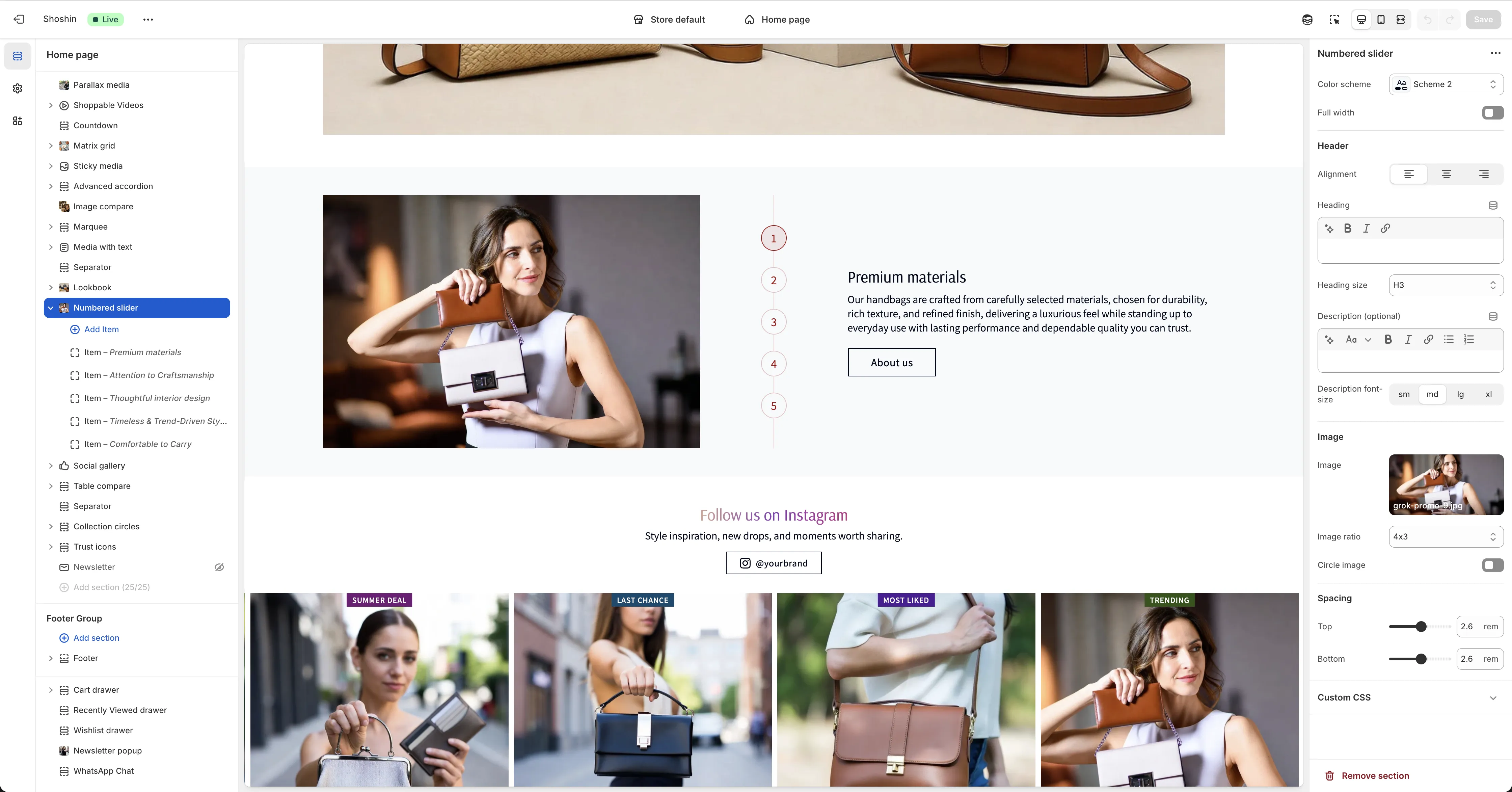
Configuration
The Numbered Slider section uses blocks for each slide, creating a dynamic presentation with numbered navigation controls.
Section Settings
In the main section settings, you can customize the overall appearance and content, including section styling, an optional title and description for the entire section (typically not necessary since individual blocks have their own titles), and the main image that displays fixed on the side on desktop.
Slide Blocks
Each slide is added as an individual block to the section. Numbered navigation controls are automatically generated for each slide you add.
Layout Behavior:
- Desktop - Numbered controls appear in the center, with the main image fixed on the side
- Mobile - Layout stacks vertically with the image at the top, numbered controls below, and slides at the bottom
Block Settings
Each slide block includes its own customization options such as title, description, and button settings.